
Using the webapp / Schedules
Schedules
Verified against Flow 5.0.0-beta.39
On this page
A schedule runs a workflow at a time you set, once or on a repeating timetable, with the parameter values each run starts with. Use one for anything that should happen without someone pressing Run it: a nightly report, a weekly clean-up, a one-off job at the end of the month.
A workflow can have several schedules, each with its own times and values. They only fire while the workflow's Scheduler trigger is on.
Where schedules live
- Schedules in the side navigation shows every schedule in the workspace, with a Workflow column and filters by workflow and status.
- The Schedules tab in the workflow editor shows only that workflow's schedules.
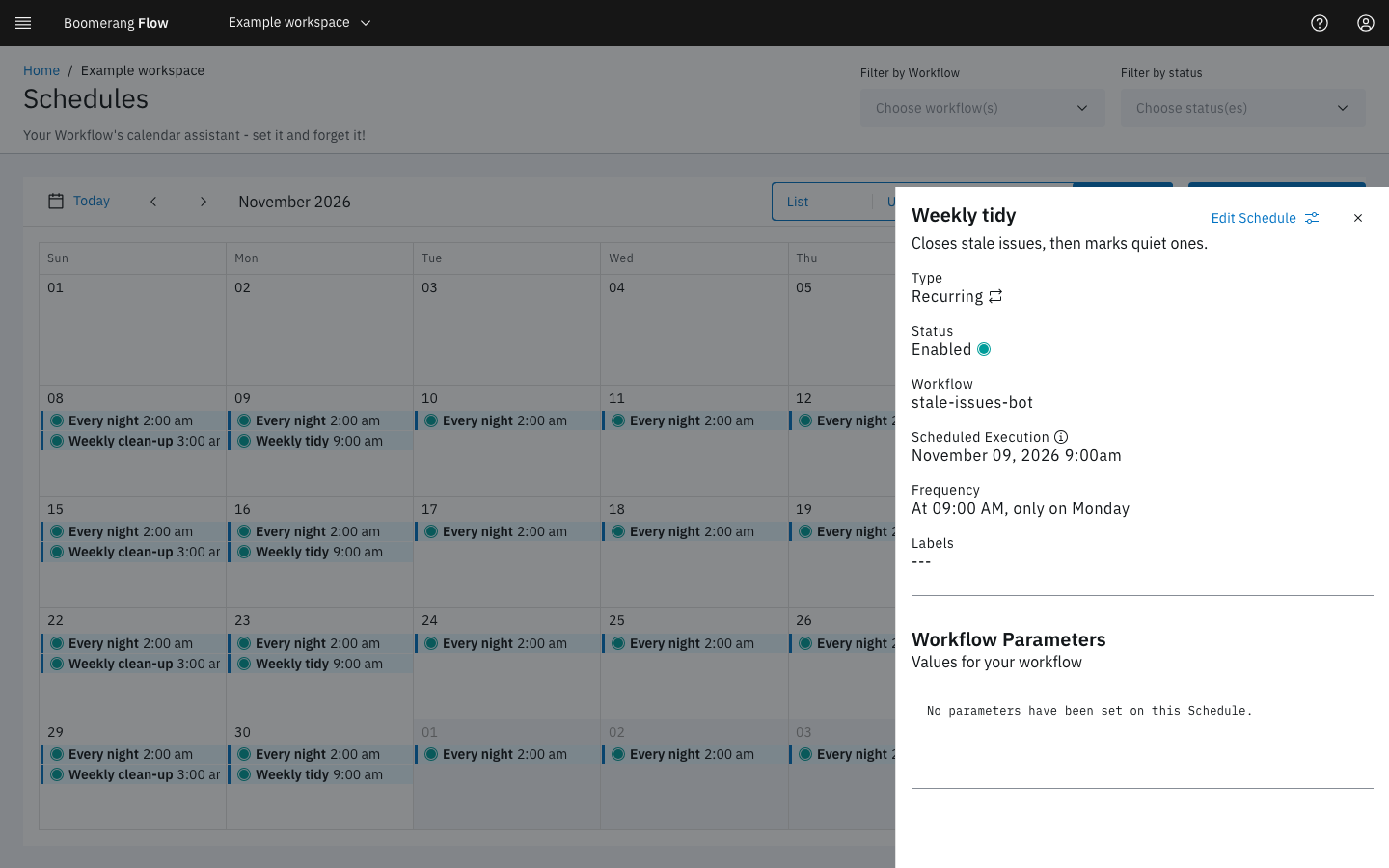
Both offer four views: List, Upcoming (the next 30 days), Week and Month. Select a schedule's name or calendar entry to open its details. In Week and Month, select today or a later day to create a run-once schedule on it. The list shows each schedule's name, when it runs in words, its Next run in your browser's time zone, its time zone and its status.
Create a schedule
Select Create schedule, then fill in:
- Workflow (on the Schedules page only), Name and Description (optional).
- When: one of Once, Hourly, Daily, Weekdays, Weekly or Custom (cron), and its settings, such as the date and time, the minute past the hour, or the days of the week.
- Time zone: your browser's zone unless you choose another. The line under it says when the schedule runs, such as "Runs every day at 9:00 AM (Australia/Sydney) · next Thu 30 Oct, 9:00 AM".
- Parameters: the values every run from this schedule starts with. Required parameters come first. A secured parameter you leave blank uses the workflow's default.
- Labels (optional): key and value pairs, to find the schedule later.
Select Create. The schedule starts Enabled, or Trigger Disabled if the workflow's Scheduler trigger is off.
Write a cron expression
Custom (cron) takes a five-field expression: minute, hour, day of month, month, day of week. Cron syntax and examples under the field explains each field. Some common ones:
| Expression | Runs |
|---|---|
0 18 * * 1-5 |
6:00 PM, Monday to Friday |
30 2 * * * |
2:30 AM every day |
0 * * * * |
At the start of every hour |
0 0 1 * * |
Midnight on the first of each month |
Flow checks the expression as you type and says what it reads, or why it can't. A six- or seven-field Quartz expression, the form v3 used, is converted to five fields.
Manage schedules
Each schedule's menu offers Edit, Enable or Disable, and Delete. A schedule shows one of these statuses:
| Status | Means |
|---|---|
| Enabled | Fires at its next time |
| Disabled | Paused by someone; it stays paused until enabled again |
| Trigger Disabled | Paused because the workflow's Scheduler trigger is off |
| Completed | A run-once schedule that has fired |
| Error | Can't fire, for example a run-once schedule enabled after its time has passed |
Turning the Scheduler trigger off and on again restores exactly the schedules that were enabled before; ones you disabled stay disabled.
What a scheduled run looks like
A scheduled run has the trigger schedule and counts against the workspace's quotas like any other run. On the run page, Initiated by links back to the schedules for its workflow.
Flow checks for due schedules every 30 seconds. If Flow was down when a schedule was due, it fires once when Flow is back, not once for every time it missed. A run that can't be submitted is tried again, 3 times in all.
To schedule a run from inside a workflow, use the Run Scheduled Workflow task. It creates a run-once schedule for a workflow at a set interval from now.
Example: a weekday report at 6 PM Sydney time
- Open the "sales-summary" workflow and select the Schedules tab.
- Select Create schedule. Name it "Weekday close".
- Under When, choose Weekdays, set At to 6:00 and choose PM.
- Set Time zone to Australia/Sydney.
- Under Parameters, set
regiontoAPAC. - Select Create.
The schedule appears as Enabled, with Next run shown in your own time zone. Each weekday evening a run appears on the Activity page with the trigger Schedule and region set to APAC.
Next steps
- Triggers: the Scheduler trigger and the other ways a run starts.
- Runs: what happens once a scheduled run starts.
- Parameters: the values a run starts with.