
Guides / Retry a run
Retry a run
Verified against Flow 5.0.0-beta.39
On this page
A retry starts a new run of the same workflow version. Tasks before the retry point keep their results instead of running again, so a run that failed at its last step doesn't repeat the work before it. A task can also retry its own failures before the run gives up. This guide is for workflow authors.
Before you start
- The owner or editor role in the workspace. A reader can't retry a run.
- A finished run to retry from the header, or a finished task to retry from. See Run a workflow.
Choose what to re-run
| Option in Re-run | What runs again | Use it when |
|---|---|---|
| Everything, from the start | Every task | The failure came from something every task depends on |
| The tasks that did not succeed, and everything after them | Each task that failed, timed out, was cancelled or is invalid, and every task after it | A task failed for a passing reason, such as a service that was down |
| Selected tasks, and everything after them | The tasks you choose in Tasks to retry from, and every task after them | You want to repeat part of a run that succeeded, such as its deploy |
Tasks that don't re-run are carried over with their results, and a later task reads those results as usual. A skipped task is planned again, so its condition decides afresh. A for-each task re-runs whole, every item included.
Retry the tasks that failed
In this example, build and test succeeded and deploy failed because the target service was down.
-
Open the failed run's page, from Activity or the workflow card's View Activity.
-
Select Retry run.
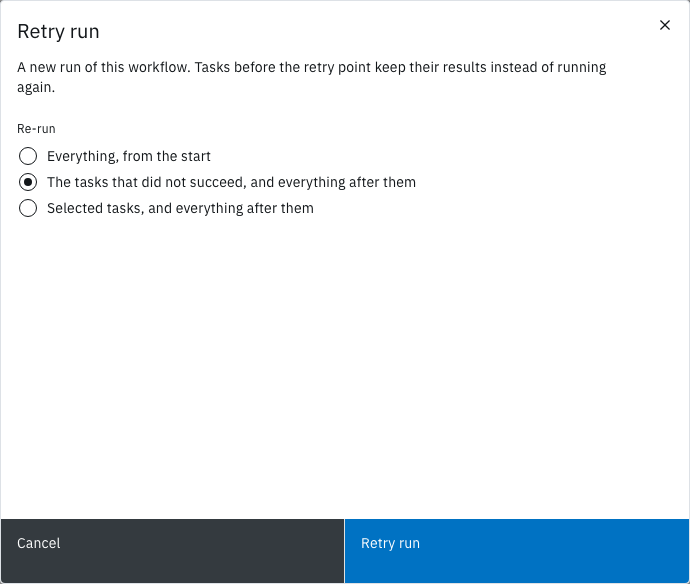
Retry run opens: "A new run of this workflow. Tasks before the retry point keep their results instead of running again."
-
Under Re-run, choose The tasks that did not succeed, and everything after them.
-
Select Retry run.
The message Retry started, "Back for another go. You’re on the new run.", appears and the page moves to the new run. Its Initiated by shows the origin run's ID followed by from the tasks that did not succeed, and its Trigger reads retry. In the task log, build and test carry a gray Reused tag, and deploy runs again. When deploy succeeds, the run's status is Succeeded.
Retry run shows on a run that ended Succeeded, Failed, Timed Out, Cancelled or Invalid. On a run where every task succeeded or was skipped, the failed-tasks option is disabled.
Retry from one task
Each finished task in the run's task log has a Retry button.
-
In the task log, select Retry on the task to start from.
Retry run opens with Selected tasks, and everything after them chosen and the task in Tasks to retry from. It reads: "Starting from
<task>: the tasks before it keep their results, and it and everything after it run again." -
Optional: add more tasks in Tasks to retry from.
-
Select Retry run.
The page moves to the new run, whose Initiated by ends with from task <name>.
Retry shows on a task that Succeeded, Failed, Timed Out, was Cancelled or is Invalid, and works on a run that's still going. Retrying an active run cancels it once the new run starts, so one line of retries never has two live runs; the modal warns This run is still active.
Know what a retry keeps
- The same workflow version. A retry never picks up a newer version. To run your fix, start a new run with Run it instead.
- The same parameter values. The modal doesn't change them; through the API, the retry request can.
- No files from the run workspace. The new run starts with an empty run workspace, so a re-run task can't read files a carried-over task wrote. When that applies, the modal warns Workspace files are not carried over. Pass such files as artifacts, or re-run everything. See Keep files between runs.
- Quotas. A retry counts as a new run against the workspace's run quotas, and is refused with
QUOTA_EXCEEDEDwhen they're full.
The origin run doesn't change. Flow keeps it while a retry of it exists.
Flow refuses a retry with WORKFLOWRUN_RETRY_INVALID, naming the cause, when the version no longer exists, when a chosen task sits between an Acquire Lock and its Release Lock, or when a task name is unknown.
Retry a run that times out
Configure › Run Options › Retries sets how many times Flow retries the whole run on its own. Despite the field's helper text, Flow uses it only when the run times out: it then starts a retry of everything at once. Blank or 0 means no automatic retry. If the workspace's quota refuses the retry, the timed-out run stays as it is.
Let a task retry its own failures
A task can retry a failure before the run moves on. On the task's Configure tab, under Retry:
- In Retries, enter the attempts after the first, from 0 to 10.
- In Backoff, choose Exponential to double the wait each time, or Fixed to keep it the same.
- In Initial wait (seconds), enter the first wait. Blank means 10 seconds.
- In Maximum wait (seconds), enter the longest wait. Blank means 300 seconds. It's disabled for Fixed.
- Select Apply, and save a version.
For example, Retries 3, Exponential, Initial wait 10 and Maximum wait 60 give a task four attempts in all:
| Attempt | Starts after the previous one fails, plus up to 5 seconds |
|---|---|
| 2 | 10 seconds |
| 3 | 20 seconds |
| 4 | 40 seconds |
With Fixed, each wait is 10 seconds. Flow adds up to 5 seconds of random jitter to every wait.
The Configure tab exists on tasks that run as a container: catalogue and workspace tasks, script tasks, Run Custom Task, the AI tasks and the artifact tasks. Under for-each, each item retries on its own budget.
A task's retries never repeat a failure a retry can't change:
| Reason | Why |
|---|---|
ImageNotAllowed, AdmissionDenied |
The cluster or dispatcher refused the task |
ResultsTooLarge |
The task's results are over the limit |
ParamUnresolved, SpecFillFailed, DispatchPrepareFailed |
A reference or the task's set-up is wrong |
ArtifactNotFound, ArtifactRefused |
The artifact is missing or over a limit |
Separately from Retries, Flow requeues a container task up to 3 times when an attempt never starts or goes unreported: the cluster has no capacity to start it, its dispatcher stops or loses its lease, or it passes its deadline with no word from the dispatcher.
Read the attempts
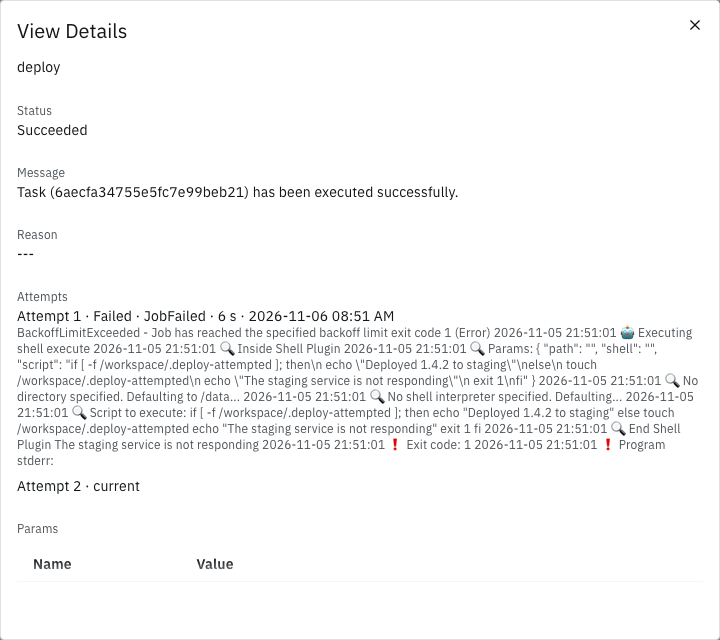
A task that ran more than once shows it on the run page:
- In the task log, its time line ends with the attempt, such as
Started at 04:25:37 PM in 6 secs, attempt 2. For-each items show the same on their own rows under Show items. - In View Details, Attempts lists one line per earlier attempt, such as
Attempt 1 · failed · JobFailed · 6 secs · <ended at>, thenAttempt 2 · current.
Not seeing what you expected?
- Why was the retry refused with
QUOTA_EXCEEDED? - Why didn't the task retry its
ParamUnresolvedfailure? - Why didn't Retries under Run Options retry a failed run?
Next steps
- Runs: statuses, timeouts and how a run ends.
- Workflow editor: the task form's Configure tab.
- Repeat a task for each item: how for-each items retry.
- Activity: find the run to retry.