
Introduction / Flow in five minutes
Flow in five minutes
Verified against Flow 5.0.0-beta.39
This page gives you the mental model: the pieces Boomerang Flow is made of, and how a run moves through them. Read it before Getting started.
What does Flow do?
Boomerang Flow builds and runs workflows: graphs of tasks that run as containers on Kubernetes. You draw a workflow on a canvas from ready-made tasks or your own images, start it by hand, on a timetable or from another system, and Flow records every run with its logs.
What are the pieces?
A workspace holds workflows, members, parameters and quotas. Each member's role (owner, editor or reader) decides what they can change. See Manage workspace.
A workflow is a graph of tasks that automates a process the same way every time. You link tasks on a canvas, and the links set the order they run in. Each save is a new version. See Workflows.
A task is one unit of work. Most run as a container: a catalogue task Flow ships, a task your workspace adds, or your own image. A few, such as approvals and sleeps, run inside Flow. A task placed on the canvas is a node. See Tasks.
A run is the record of one execution of a workflow: the version it ran, what started it, and a task run for every task. Each run and task run carries a status, the outcome you see (such as Running or Succeeded), and a phase, its place in the lifecycle. See Runs.
A trigger is how a run starts: manual, schedule, webhook, event or GitHub. You turn each one on or off per workflow. See Triggers.
A parameter is a named value a task reads, written as a reference such as $(params.region). Values come from five layers: global, workspace, workflow, task and the run's context. When two layers hold a value, the later one in that list wins. See Parameters.
An action is a point where a person decides: an approval, where someone approves or rejects, or a manual task, where someone does a step by hand. The run waits there without using up its timeout. See Actions.
A run workspace is a volume the tasks of one run share, so one task can write a file and the next can read it. It's removed when the run completes. An artifact is a file a task uploads to keep: run-scoped, kept with its run, or workflow-scoped, kept for later runs. See Artifacts and the run workspace.
A dispatcher runs the containers. It claims ready tasks, runs each one, and reports how it ended. Flow ships a Kubernetes dispatcher that runs each task as a pod; you can write your own. See Dispatchers.
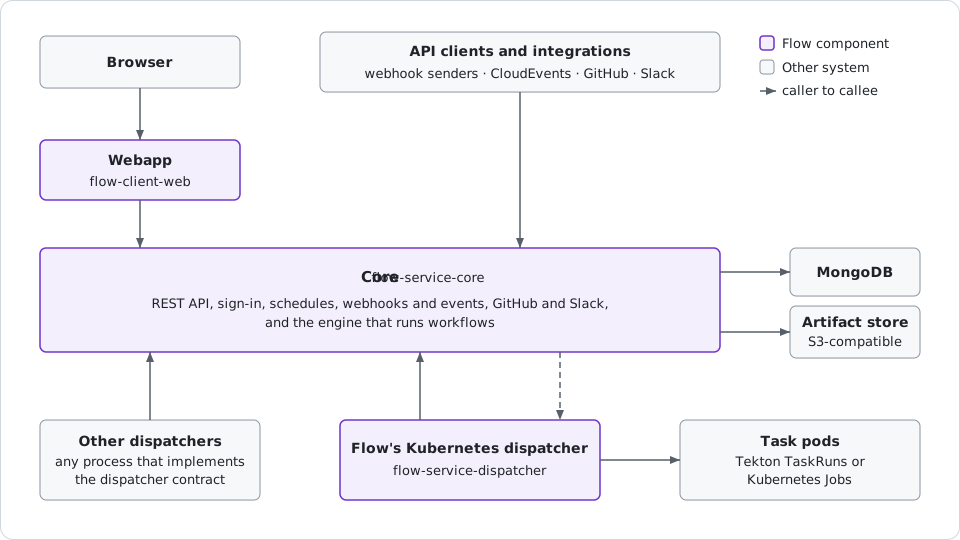
Core is Flow's server: the API and the engine that runs workflows. Your browser talks only to the webapp. Dispatchers call core for work; core never pushes it.
What happens when you run a workflow?
- Submit. You select Run it, or a schedule, webhook, event, GitHub delivery or API call starts the run for you. Flow refuses it if that trigger is off or a workspace quota is reached.
- Admit the run. Flow resolves the run's parameters, creates a task run for every task, and checks the graph. A run over its workflow's concurrency limit waits for a slot.
- Ready each task. When the graph reaches a task, Flow resolves the task's parameters. Approvals, switches, sleeps and child workflows run inside Flow. A task that runs a container shows Ready until a dispatcher claims it.
- Run the container. The dispatcher starts the container, and when it exits, reports how it ended, with the task's results. A non-zero exit code fails the task.
- Finish. Each end unblocks the tasks linked after it, which go back to step 3. Once the graph is done, the run takes its final status.
Overview covers the same steps for operators.
Next: Getting started, to build and run your first workflow.