
Guides / Repeat a task for each item
Repeat a task for each item
Verified against Flow 5.0.0-beta.39
On this page
A for-each task runs one task once for every item in a list, in parallel, inside the same run. Use it to deploy to several regions, process each file in a batch, or call a service once per record. This guide is for workflow authors.
Before you start
- A workflow you can edit. You need the owner or editor role in its workspace. See Create a workflow.
- The list, as a JSON array. Type it in, keep it in a parameter, or take it from an earlier task's result.
How for-each works
The task stays one node on the canvas. When the run reaches it, Flow resolves its items to an array and creates one task run per item, named <task name>[<index>] with the index counted from 0. Items run in parallel, as fast as dispatchers claim them, and share the run workspace.
Inside each item, $(params.item) is the current item and $(params.index) its position. The task succeeds when every item succeeds.
Only tasks that run as a container can repeat: catalogue and workspace tasks, Execute Shell, Run Python Script, Run Custom Task, the AI tasks, Upload Artifact and Download Artifact. Switches, approvals, waits, locks and Run Workflow can't.
Add a for-each task
This example deploys to three regions. The region list is a workflow parameter, so each run can change it.
-
In the editor, open the Parameters tab and select Add parameter.
-
Enter the Name
regions, leave Type as Text, and enter the Default value (optional)["sydney","london","virginia"]. -
Select Add.
-
Open the Canvas tab. In Add a task, the Workflow category is open: drag For each onto the canvas.
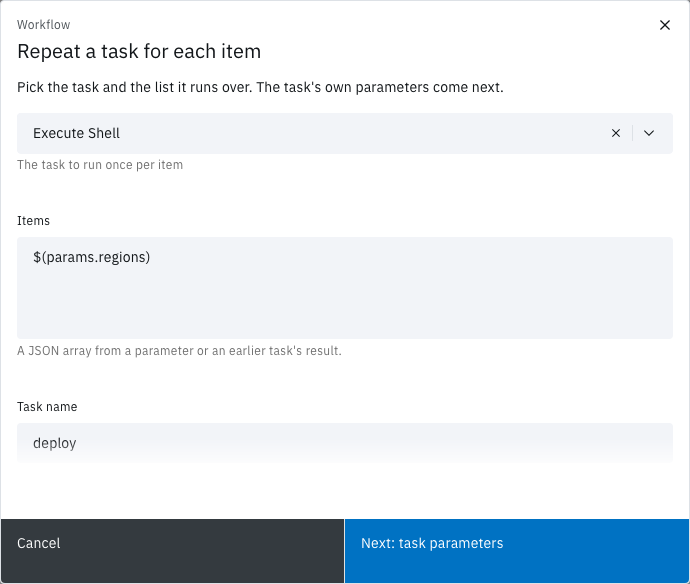
Repeat a task for each item opens.
-
In Task, choose Execute Shell.
-
In Items, enter
$(params.regions). -
In Task name, enter
deploy. Flow fills in the task's display name until you type your own. -
Select Next: task parameters.
The task's own form, Edit Execute Shell, opens.
-
Select the Shell Script field. In Update Shell Script, enter:
echo "Deploying item $(params.index) to $(params.item)" -
Select Update, then Apply.
The node shows a purple For each badge and is drawn as a stack of cards.
-
Drag a link from Start to
deploy, and fromdeployto End. -
On the Workflows page, select Run it on the workflow's card, then Run and View.
The run page opens. When the run ends, the deploy node's badge reads For each · 3 of 3 succeeded and the run's status is Succeeded.
To turn for-each on for a task that's already on the canvas, open its form, select the Configure tab and turn on Run for each item, then enter the Items. The tab shows a purple For each tag while it's on. Turning it off makes the task an ordinary one again.
Where the items come from
Items takes a JSON array, or a single reference whose value is an array or text holding one.
| Items | Example | Checked |
|---|---|---|
| A JSON array | ["sydney","london","virginia"] |
When you save the version |
| A parameter | $(params.regions) |
When the run reaches the task |
| An earlier task's result | $(tasks.list-regions.results.regions) |
When the run reaches the task |
Anything else shows Enter a JSON array or a single reference such as $(params.items), and Next: task parameters and Apply stay disabled.
An item can be text, a number, an object or an array. An object or array reaches the task as JSON text, and $(params.index) is always text. A container reads the same values as the environment variables PARAM_ITEM and PARAM_INDEX.
Two names are reserved:
- A task that declares its own
itemorindexparameter can't run for each item. Saving refuses it. - A task name can't end in
[and a number], such asdeploy[2], because item names take that form. The form shows Task names cannot end in [ and a number ]; that form is reserved for for-each items. Other brackets, such asDeploy [prod], are allowed.
Follow the items on the run page
The run page groups every item under its task:
- On the canvas, the badge reads For each before the task fans out, then For each ·
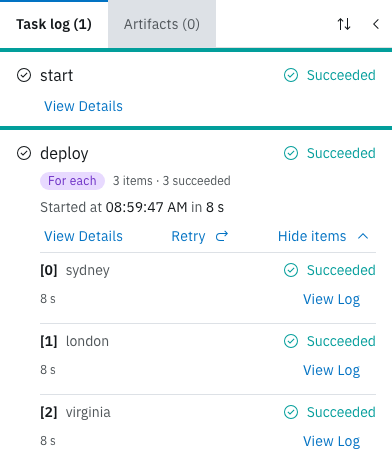
<succeeded>of<total>succeeded. It reads For each · 0 items when the array was empty. - In the task log, the task's entry carries a purple For each tag and a summary such as
3 items · 3 succeeded, adding· 1 runningor· 1 failedwhile either isn't zero. The task itself runs nothing, so it has no View Log. - Select Show items to list one row per item: its index, such as
[0], the item, its status, the failure reason, its duration, the attempt from the second one on, and its own View Log. - Select View Details on the task to read the outcome: Message reads
All 3 items succeeded.or, for example,1 of 3 items did not succeed.
Use the results
After the task, $(tasks.<name>.results.<result>) is an array in item order, with null for an item that didn't succeed. For example, if deploy declared a result url and the second item failed, a later task reading $(tasks.deploy.results.url) gets:
["https://sydney.example.com", null, "https://virginia.example.com"]A task that declares no results collects each result its items produced into such an array. An empty array of items succeeds at once, with empty arrays as its results.
Each item's results are capped like any task's: 4096 bytes on Flow's Kubernetes dispatcher. If the combined arrays pass MongoDB's 16 MB document limit, the task fails with ResultsTooLarge and keeps no results.
When an item fails
Any item that doesn't succeed fails the whole task, with the reason ItemFailed. The other items still finish.
- To carry on to the next task anyway, set the link after the for-each task to always: select the link's condition icon until it shows always.
- To retry a failing item, set Retries on the task's Configure tab. Each item retries on its own budget. See Retry a run.
- An item that times out times out the whole run, which cancels the remaining items. Cancelling the run cancels every item.
- Retrying the run re-runs the for-each task whole, every item included.
Limits
- Maximum items. Admin › Settings › Run limits › Maximum For-Each Items caps the items, 256 by default. Saving refuses a typed array over the cap. Items that resolve over the cap at run time fail the task with
ForeachTooManyItems, and no item runs. - Not an array. Items that don't resolve to an array fail the task with
ForeachItemsInvalid. - Not built. There's no batching, failure tolerance, parallel limit, re-run of only the failed items, or repeating a group of several tasks. To repeat several tasks, put them in their own workflow. The API accepts for-each on a Run Workflow task, which starts one child run per item, but the canvas doesn't offer it.
Insights counts a for-each task's items under the task's name, and its Task runs panel can group by For-each item. See Insights.
Not seeing what you expected?
- Why did the items fail with
ParamUnresolved? - Why do the items stay Ready?
- Why did one item time out the whole run?
Next steps
- Workflow editor: links, conditions and the task form.
- Parameters: how
$(params.x)and$(tasks.t.results.r)resolve. - Runs: statuses, timeouts and attempts.
- Retry a run: run a failed for-each task again.